StudioEditor.io
Overview
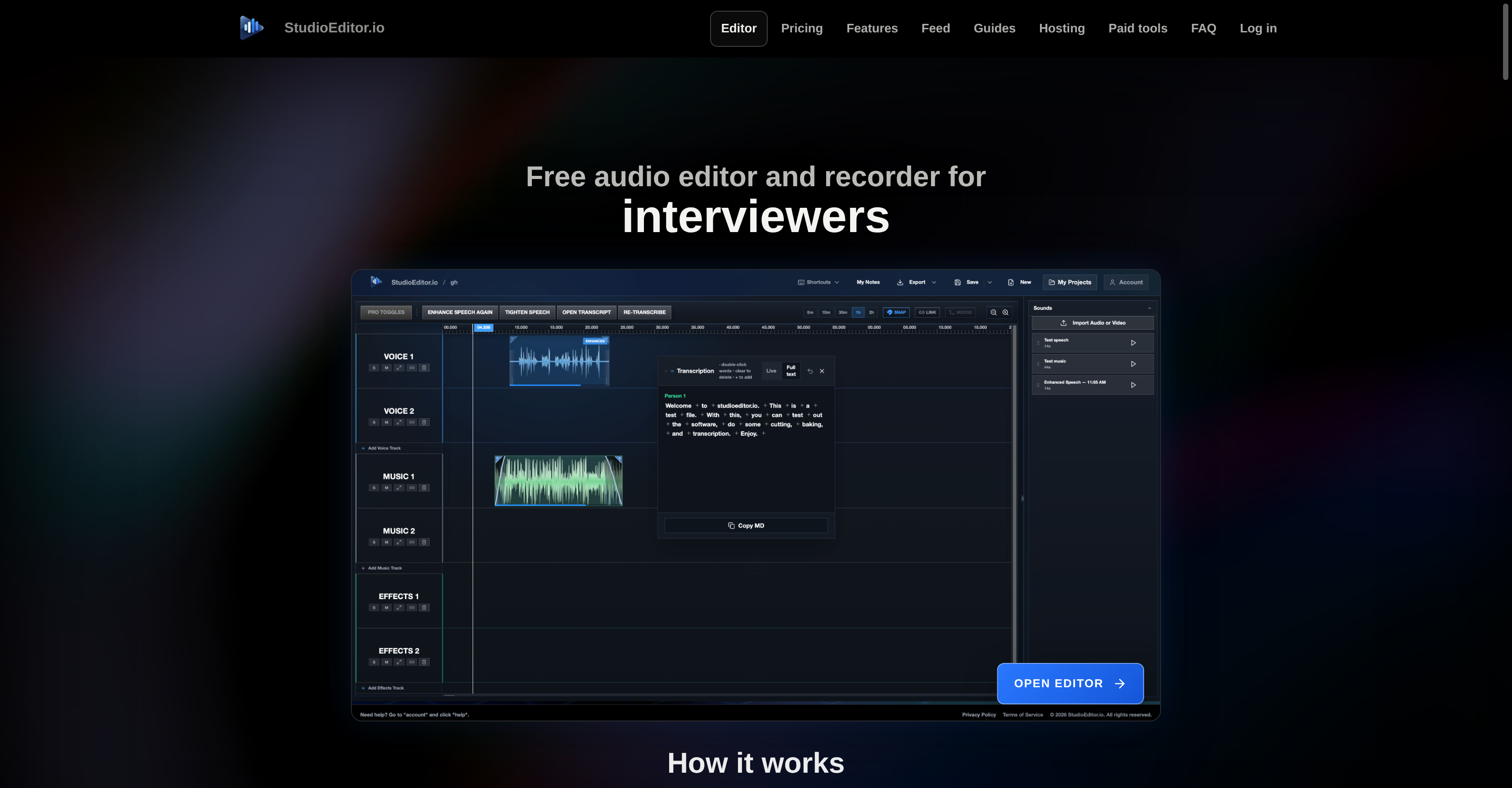
- Produce polished voice recordings without studio gear using Auto Enhance to level and polish audio for professional sound quality.
- Mix speech, music, and effects flawlessly with AutoDuck, balancing tracks automatically for a professional mix.
- Eliminate awkward silences and maintain natural conversation flow with Auto Tighten Speech that reduces long gaps.
- Create and edit high-quality transcripts and subtitles in SRT, VTT, PDF, Word, and plain text directly in the browser.
- Generate podcast summaries and episode descriptions instantly to prepare content for publishing without extra tools.
- Start recording immediately without downloads or installations, operating entirely within your web browser for audio content creation.
- Save work-in-progress projects and export finished audio files, enabling seamless podcast editing and production workflows.
- Access professional audio editing features through a free account with 60 processing credits for enhancing, transcribing, and transforming audio.
Pros & Cons
Pros
- Online audio recorder
- Intuitive interface
- Podcast creation tool
- Direct browser exports
- Timeline editing feature
- Audio enhancement tools
- Transcription feature included
- Subtitle feature included
- Multi-format transcription exports
- Episode description generator
- No software downloads needed
- Online audio editor
- Processing credits with account
- Comprehensive audio content creation
- Excellent for learners.
- Advanced features available
- Browser-based, no installation
- AutoDuck for audio mixing
- Auto Enhance for voice
- Tightens long audio gaps
- Summary generation for podcasts
- Supports SRT, VTT formats
- Supports PDF, Word formats
- Music and speech mixing
- Direct editing of transcripts
- Professional grade editing accessible
- Summary and description generation
- Auto mixing of effects
- Credits for audio processing
- Advanced feature without complexity
- Audio polishing tools
- Ideal for podcasters, educators
Cons
- Requires account creation
- Limited free processing credits
- Internet connection dependency
- No offline functionality
- May have processing delays
- No advanced user interface
- Limited export formats
- Potentially costly for high-volume users
Reviews
Rate this tool
Loading reviews...
❓ Frequently Asked Questions
StudioEditor is an online tool used for recording, editing, and exporting audio directly from a browser. It features an intuitive interface and is designed for podcasters, interviewers, creators, and educators who aim to produce superior audio products free from technical barriers.
StudioEditor operates completely within a web browser. Users can record, import, cut, arrange, and adjust audio in the tool's timeline. The platform also allows audio enhancement, mixing of speech, music and effects using the AutoDuck feature, and polishing voice recordings with Auto Enhance. The software enables the creation and editing of high-quality transcript or subtitle files. Users can also generate a summary and episode description for podcasts within the tool itself. StudioEditor allows users to save their work in progress and export finished audio.
StudioEditor's main features include recording ability, timeline editing, and finished-audio exports. The software also provides audio enhancement tools such as AutoDuck and Auto Enhance. Other features include the ability to generate a summary and episode description for podcasts, the ability to tighten long gaps in conversations for a natural audio flow, and the transcription and subtitle functionality allowing the creation and direct editing of transcript or subtitle files in various formats.
The AutoDuck feature in StudioEditor allows flawless mixing of speech, music, and effects. It works in the background or can be toggled on for more advanced users, managing the audio mixing process to ensure a balanced and professional sound.
Auto Enhance in StudioEditor is designed to improve the quality of voice recordings. It polishes and levels voice recordings to provide high-quality audio.
Audio can be recorded directly in StudioEditor. All that's required is to sign in with a free account, and you can start recording directly in the tool, without needing to install or download anything.
Yes, StudioEditor provides transcription and subtitle services. Users can create and directly edit high-quality transcript or subtitle files directly in the browser.
Yes, users can save work-in-progress projects on StudioEditor. This allows for continued work on the project at a later time if needed.
Processing credits in StudioEditor are used for jobs that involve analyzing or transforming audio. Each new account comes with 60 processing credits that can be used for tasks such as enhancing spoken audio, tightening long pauses, and creating transcripts or subtitle files.
StudioEditor enhances audio quality by providing tools such as Auto Enhance, which levels and polishes voice recordings. It also provides AutoDuck for impeccable mixing of speech, music, and effects.
Yes, StudioEditor allows users to generate a summary and episode description for podcasts. This feature can help in effectively summarizing each episode and preparing it for publishing.
Yes, StudioEditor supports audio file export. Users can export their finished audio upon completion.
StudioEditor supports several formats for transcript or subtitle files including SRT, VTT, PDF, Word, and plain text.
Yes, StudioEditor is a browser-based tool. All recording, editing, and exporting operations are conducted directly within the user's web browser.
Yes, within StudioEditor, users can mix speech and music using the AutoDuck feature. This feature ensures a balanced and professional mix of audio elements.
Yes, StudioEditor has an Auto Tighten Speech feature, which allows users to reduce long pauses in conversations while still preserving a natural flow of speech.
StudioEditor is suitable for educators due to its intuitive interface, simple operation, and feature set designed to produce high-quality audio. Educators can use it to record lessons, interviews, or podcasts, and then edit and export these directly from their browser. The tool’s audio transcription functionality also makes it potentially useful in the creation of educational resources such as transcripts for accessibility purposes.
No, users will not need to download or install anything to use StudioEditor. It operates completely within the user’s web browser, making it a convenient tool for audio work on any computer with an internet connection.
StudioEditor facilitates easy audio content creation through its seamless recording, editing, and exporting capabilities. The platform's intuitive interface is quick to learn and offers features like timeline editing, mixing of speech, music, and effects with AutoDuck, and leveling of voice recordings with Auto Enhance. It provides text transcription, podcast summary creation, and enables the tightening of long conversation gaps. All these tools are designed to simplify the audio creation process, removing technical barriers for users.
StudioEditor offers advanced features such as AutoDuck for professional level mixing of speech, music, and effects, and Auto Enhance for improving the quality of voice recordings. It also provides transcription and subtitle services, allowing the creation and direct editing of high-quality transcript or subtitle files in several formats. Further, it enables the tightening of long gaps in conversation and offers an episode description generator for podcasts, among other functionalities.
Pricing
Pricing model
Freemium
Paid options from
$6.87/month
Billing frequency
Monthly
Refund policy
No Refunds